Adult IPTV M3U Playlists: Technical Format, Players & Troubleshooting

Understand how an M3U playlist works under the hood, compare remote M3U URLs against local files, evaluate playlist safety, and resolve common loading or expiration errors.

Laptop, streaming box, and tablet workstation displaying a deep navy media player playlist configuration interface

Authenticated M3U & Xtream Subscription Plans

Avoid expired or unstable public links. Every subscription below includes private M3U and Xtream credentials across 1 to 4 concurrent connections.

5.0 / 5.0 148 ratings
Select Simultaneous Connections
Quarterly access

3 Months

$29.99USD
1 Connection · $29.99 / connection
Standard single-connection rate
  • Full Live TV & Adult 18+ Categories
  • HD, Full HD & UHD Streams
  • M3U & Xtream Login Credentials
  • Optional Parental PIN Support
Select 3 Months
Semi-annual access

6 Months

$49.99USD
1 Connection · $49.99 / connection
Standard single-connection rate
  • Full Live TV & Adult 18+ Categories
  • HD, Full HD & UHD Streams
  • Smart TV, Fire TV & Mobile Ready
  • Setup & Player Guidance Included
Select 6 Months
24-month access

2 Years

$129.99USD
1 Connection · $129.99 / connection
Standard single-connection rate
  • Full Live TV & Adult 18+ Categories
  • HD, Full HD & UHD Streams
  • Multi-Device M3U & Portal Access
  • Long-Term Continuity & Support
Select 2 Years

What Is an Adult IPTV M3U Playlist and How Does It Work?

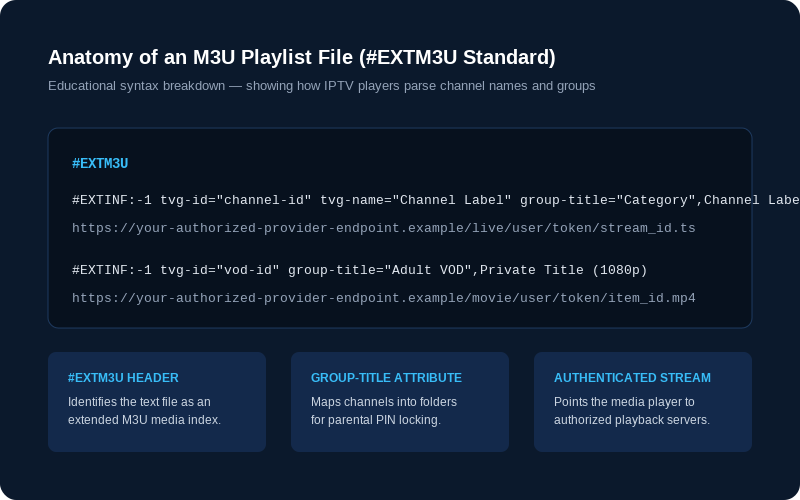
An M3U playlist (Moving Picture Experts Group Audio Layer 3 Uniform Resource Locator) is not a video file itself. Instead, it is a lightweight plain-text index formatted with the #EXTM3U standard that tells an IPTV media player where to locate live streams and on-demand entries.

Each entry pairs an #EXTINF metadata line—containing attributes like tvg-id, channel display title, and group-title—with a stream endpoint on the following line. Because group-title defines folder boundaries, apps rely on accurate M3U syntax to separate IPTV adult channels from everyday categories so you can apply a parental PIN.

Educational diagram illustrating #EXTM3U header, #EXTINF metadata attributes, group-title tags, and stream endpoint structure
Illustrative anatomy of an extended #EXTM3U playlist file (example syntax only).

M3U URL vs. Local .m3u File: Which Should You Use?

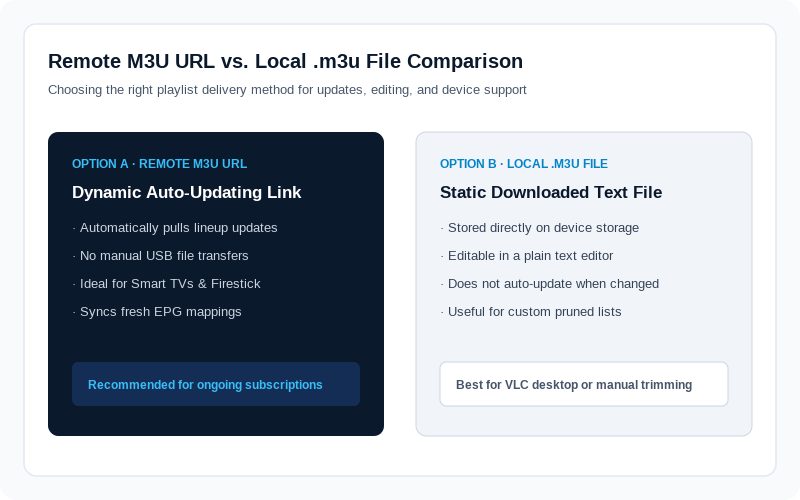
When setting up an IPTV adults M3U or IPTV adult M3U playlist, you will typically encounter two delivery formats: a remote URL or a downloadable .m3u file.

  • Remote M3U URL: An HTTPS address pasted into your player. Whenever your provider updates channels or EPG mappings, the app pulls those changes automatically on refresh.
  • Local .m3u File: A static text document saved directly onto a computer, USB stick, or phone. Useful if you manually edit out unwanted channels in a text editor, though it will not auto-update when streams change.
Comparison between Remote M3U URL dynamic updates and Local .m3u static text files
Key functional differences between remote playlist URLs and local .m3u files.

Compatible IPTV Players & Basic Configuration

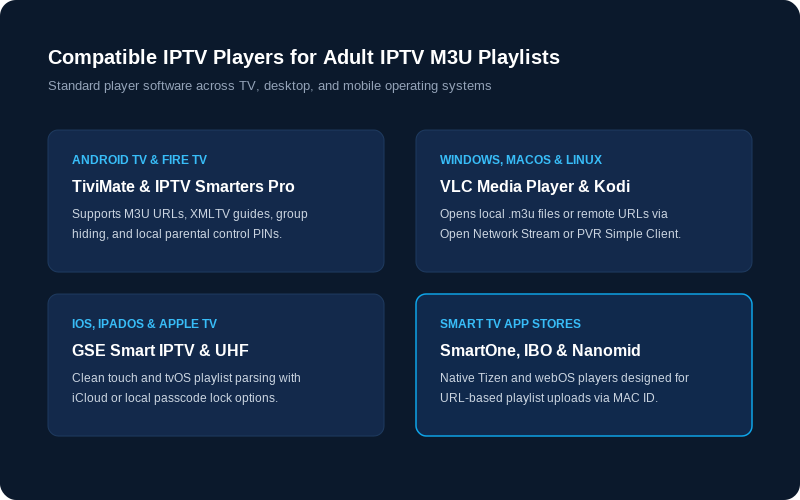
Because M3U is an open playlist specification, you can load your playlist into widely used media applications across nearly any operating system:

  • Android TV & Fire TV: TiviMate, IPTV Smarters Pro, and XCIPTV support automatic M3U Plus group parsing and PIN locking.
  • Desktop (Windows, macOS, Linux): VLC Media Player opens both local .m3u files and remote URLs via Media → Open Network Stream; Kodi works via PVR IPTV Simple Client.
  • Apple Devices (iOS, iPadOS, tvOS): GSE Smart IPTV and UHF provide touch-friendly playlist management.
  • Smart TV Portals (Samsung & LG): SmartOne, IBO Player, and Nanomid load M3U URLs linked to your TV's device ID.

Once loaded, remember to set a local lock if sharing your TV—see our IPTV adult password & PIN guide for step-by-step instructions.

Grid of compatible IPTV players across Android TV, Fire TV, Windows/Mac, iOS/Apple TV, and Smart TV app stores
Cross-platform media players supporting M3U and M3U Plus playlists.

Troubleshooting Common Playlist & Expiration Errors

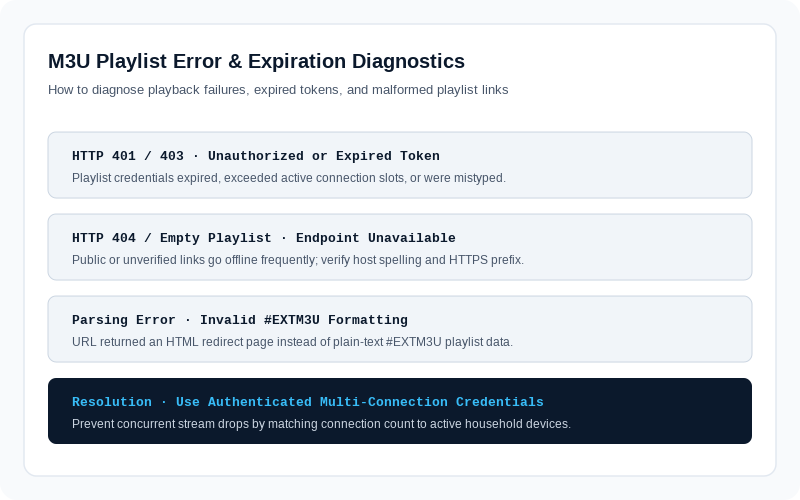
When an M3U playlist fails to load channels or stops mid-stream, checking the error pattern points directly to the cause:

  • HTTP 401 / 403 Unauthorized: Your subscription term expired, your login token changed, or the URL contains a typo introduced when typing on a TV remote.
  • HTTP 404 or Empty Playlist: The host endpoint no longer exists—common with unverified links found on public websites.
  • Parsing / Format Error: The server returned an HTML webpage instead of plain-text #EXTM3U data, often due to an incorrect URL path.
  • Stream Stalls After 10 Seconds: Another device is already using your single active connection slot. Upgrading to 2, 3, or 4 connections resolves multi-screen conflicts.
Diagnostic summary of HTTP 401/403 unauthorized, HTTP 404 endpoint unavailable, and #EXTM3U parsing errors
Quick reference for diagnosing M3U authentication, parsing, and connection errors.

Security, Privacy & Evaluating Unknown M3U Playlists

Why exercising caution with unverified online M3U links protects both your devices and network privacy.

Safety & Verification Notice: We do not publish unverified third-party M3U links. Unknown playlists circulated on forums or social channels may be expired, insecure, overloaded, or unauthorized—never assume a random public playlist is safe, active, or universally compatible.

Prefer HTTPS Endpoints

Whenever supported by your IPTV player, use HTTPS playlist URLs rather than unencrypted HTTP so login tokens and metadata are protected in transit.

Avoid Suspicious App APKs

Stick to reputable, well-known IPTV players installed from official app stores rather than modified APKs bundled with unknown M3U lists.

Frequently Asked Questions About Adult IPTV M3U

Ready for Reliable Authenticated M3U Access?

Choose a 1- to 4-connection subscription above or contact our team for setup advice on TiviMate, VLC, IPTV Smarters, or Smart TV apps.